Cybersecurity
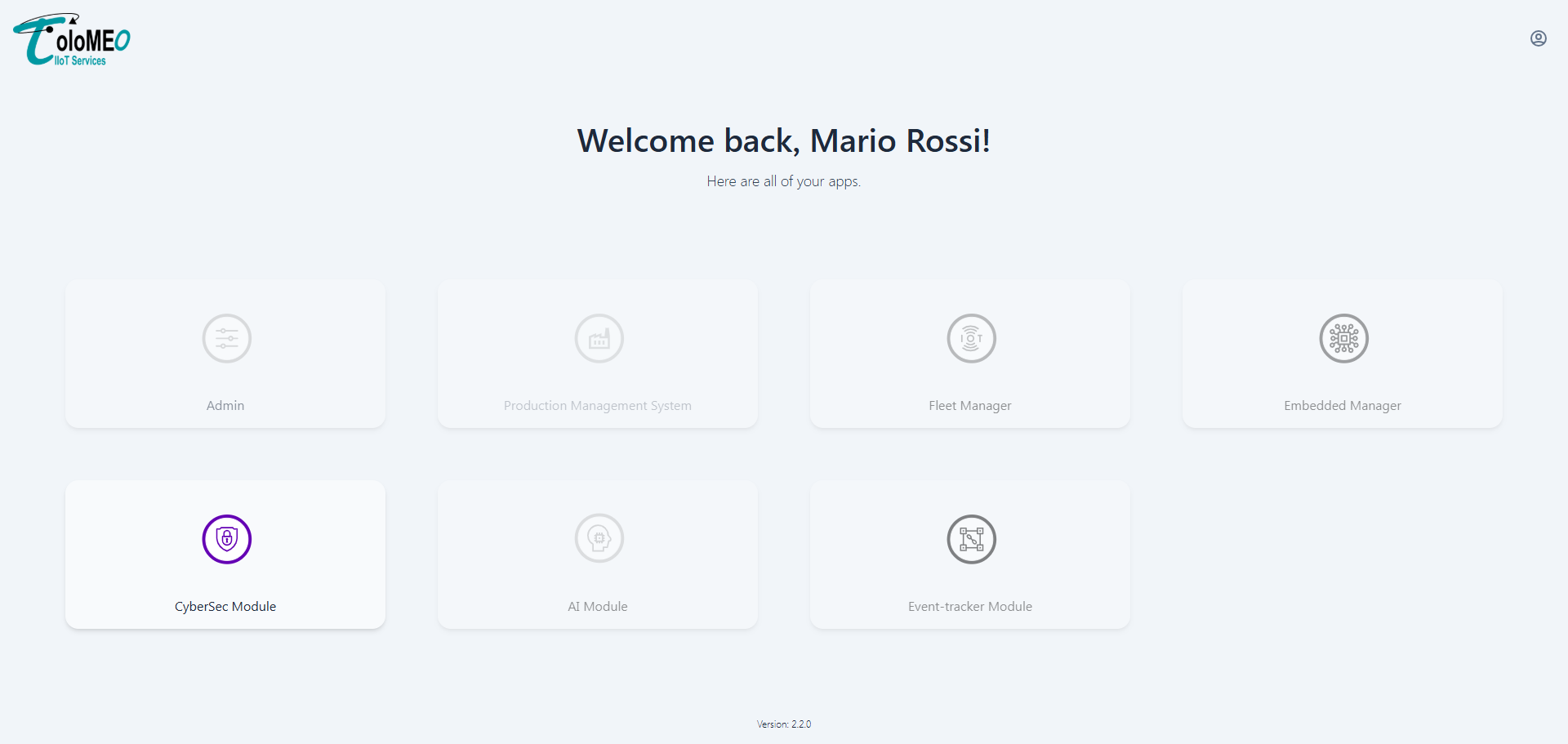
The Cybersecurity module provides SBOM-based vulnerability management for firmware models. It ingests software bill of materials files, runs CVE analysis, and gives operators the tools to triage findings, set up alert notifications, and generate PDF security reports.
SBOM, VEX and VDR
The module works with three related document types, all expressed in the CycloneDX format:
- SBOM (Software Bill of Materials)
- The inventory of every software component that makes up a firmware image, with versions and licenses. It answers the question "what is inside this firmware". It is the input to the analysis: components are matched against CVE databases to discover which known vulnerabilities could affect the image.
- VEX (Vulnerability Exploitability eXchange)
- The assessment layer on top of the SBOM. For each vulnerability it records whether the product is actually affected and why, so that CVEs which are present in a component but not reachable or exploitable in your build can be marked not affected with a justification. It answers "does this vulnerability actually matter for this product", turning a raw list of CVE matches into a triaged risk picture.
- VDR (Vulnerability Disclosure Report)
- A single document that combines the component inventory with the current state of every known vulnerability and its assessment. It is the artifact you hand to a customer or auditor as the machine-readable statement of a firmware version's security posture at a point in time.
Maintaining these documents is increasingly a regulatory requirement rather than a good practice. The EU Cyber Resilience Act (CRA) obliges manufacturers of products with digital elements to produce and keep an SBOM and to handle vulnerabilities across the product lifecycle, and the industrial security standard IEC 62443 (notably 62443-4-1) requires a defined process for identifying, assessing, and disclosing vulnerabilities in the components a product ships. The SBOM, VEX, and VDR are the concrete evidence that satisfies these obligations, and this module is built around producing and keeping them current.
Dashboard
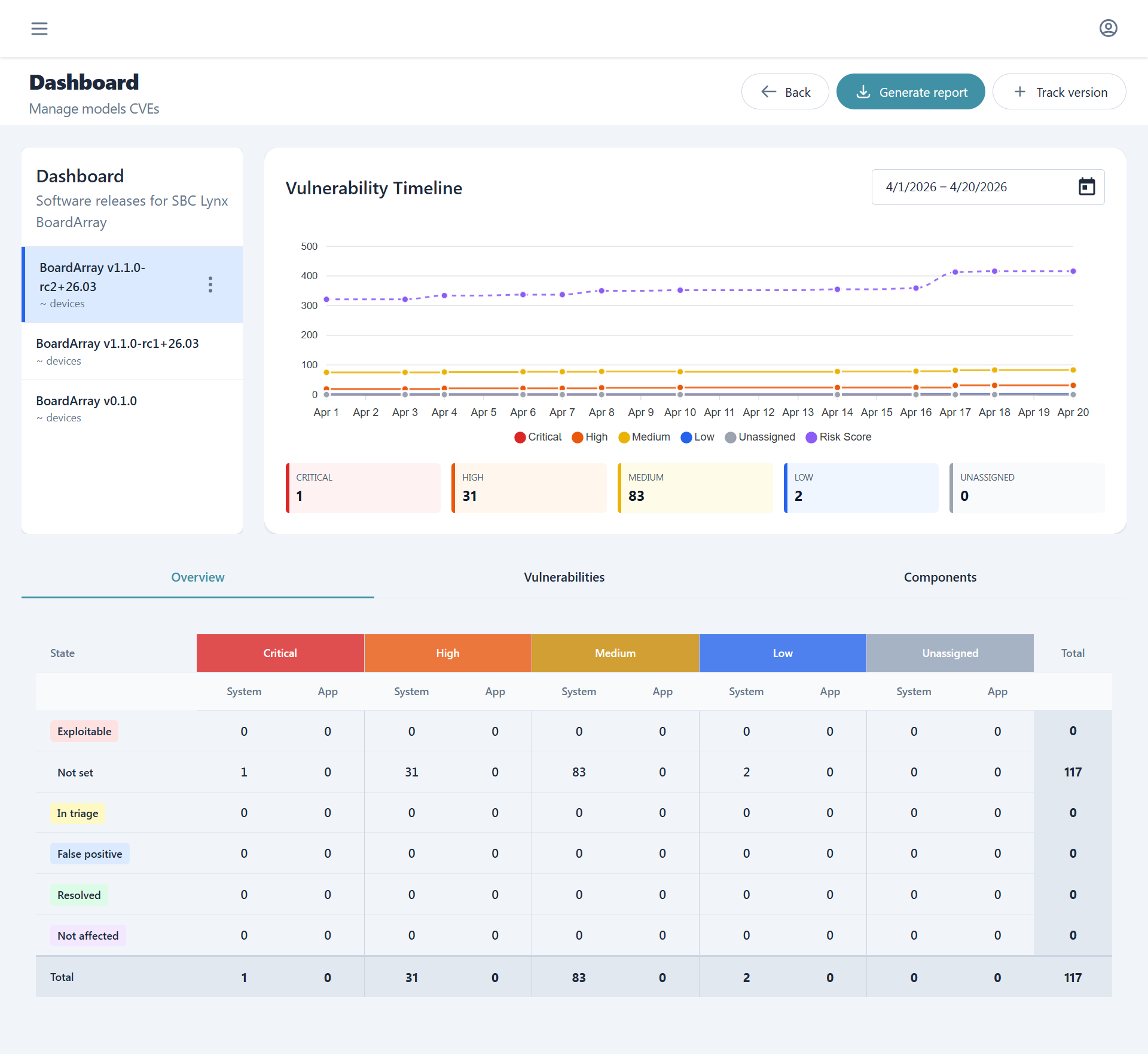
The dashboard empowers the user to switch between different firmware versions while being able to check, at a glance, current and historical data about vulnerabilities. From here one can also generate accurate and tracked reports or perform triage of affecting vulnerabilities.
Project structure
Cybersecurity tracking is organized per model, mirroring the PMS model hierarchy:
Model: "DeviceX"
├── Firmware DeviceX v1.0.0
├── Firmware DeviceX v1.1.0
└── Firmware DeviceX v2.0.0
Each enabled firmware release promoted in PMS Models or Embedded Manager gets a corresponding project for SBOM and CVE tracking.
Vulnerability timeline
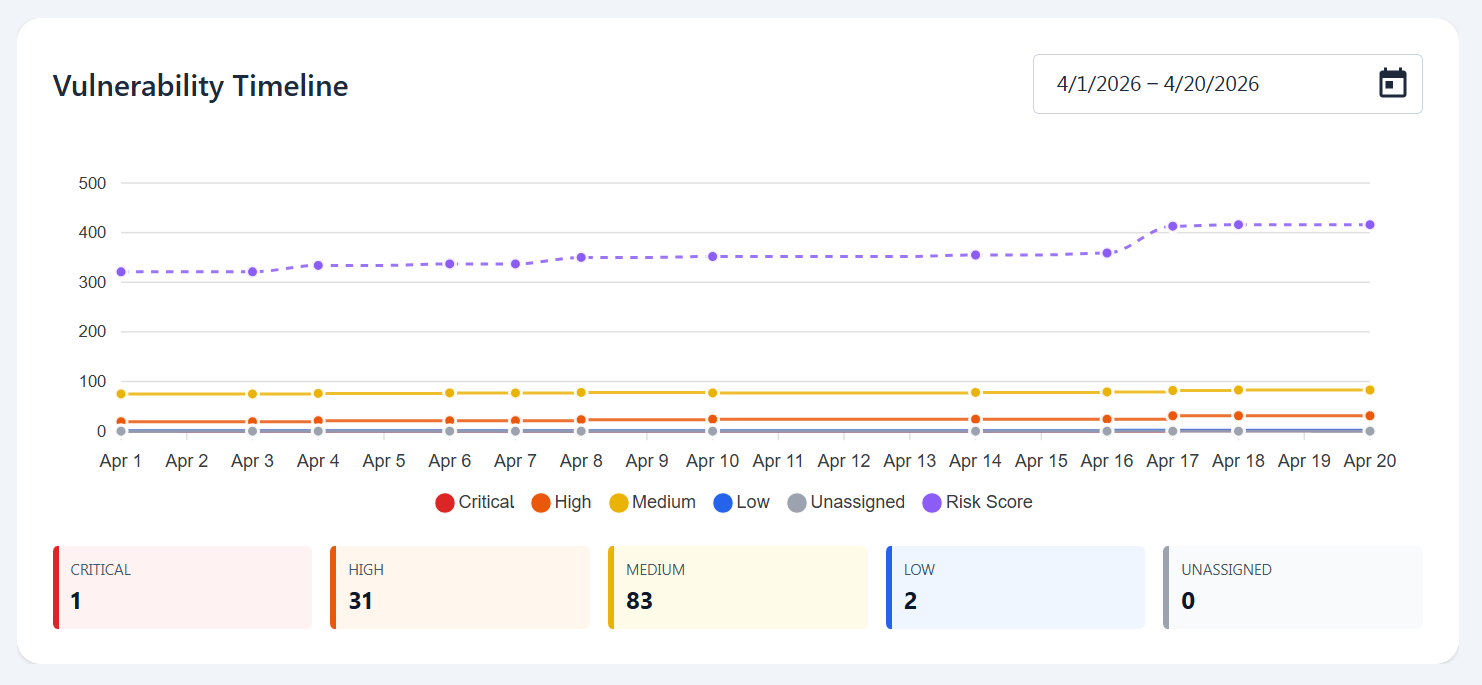
The vulnerability timeline shows the historical data of vulnerabilities per severity and risk score while enabling the user to select whichever time interval of the tracked sbom and decide which are the information they want it to report with a simple click.
SBOM and VEX upload
Tracking sboms of already uploaded firmwares is done through the track version button. SBOMs must be in CycloneDX format and once uploaded, they are processed by our servers matching components against known CVE databases and populating the vulnerability views.
VEX (Vulnerability Exploitability eXchange) files can be uploaded alongside SBOMs to suppress false positives and apply known-not-affected justifications at the component level.
SBOM and VEX are all results of builds from the meta-tolomeo metalayer or can be obtained as well from the automated builds in the Embedded Manager. For a step-by-step walkthrough of uploading, triaging, and reporting, see the SBOM Tracking flow.
Downloads
The actions menu on the selected firmware version also lets you download its tracked artifacts:
| Download | Content |
|---|---|
| SBOM | The tracked Software Bill of Materials in CycloneDX format |
| VEX | The current Vulnerability Exploitability eXchange, reflecting the triage decisions applied so far |
| VDR | A Vulnerability Disclosure Report combining the component inventory with the outstanding vulnerabilities and their state |
The VDR is a machine-readable counterpart to the human-readable PDF Reports: it is meant to be shared with customers or auditors as a single document describing both what the firmware contains and how each known vulnerability was assessed.
Overview
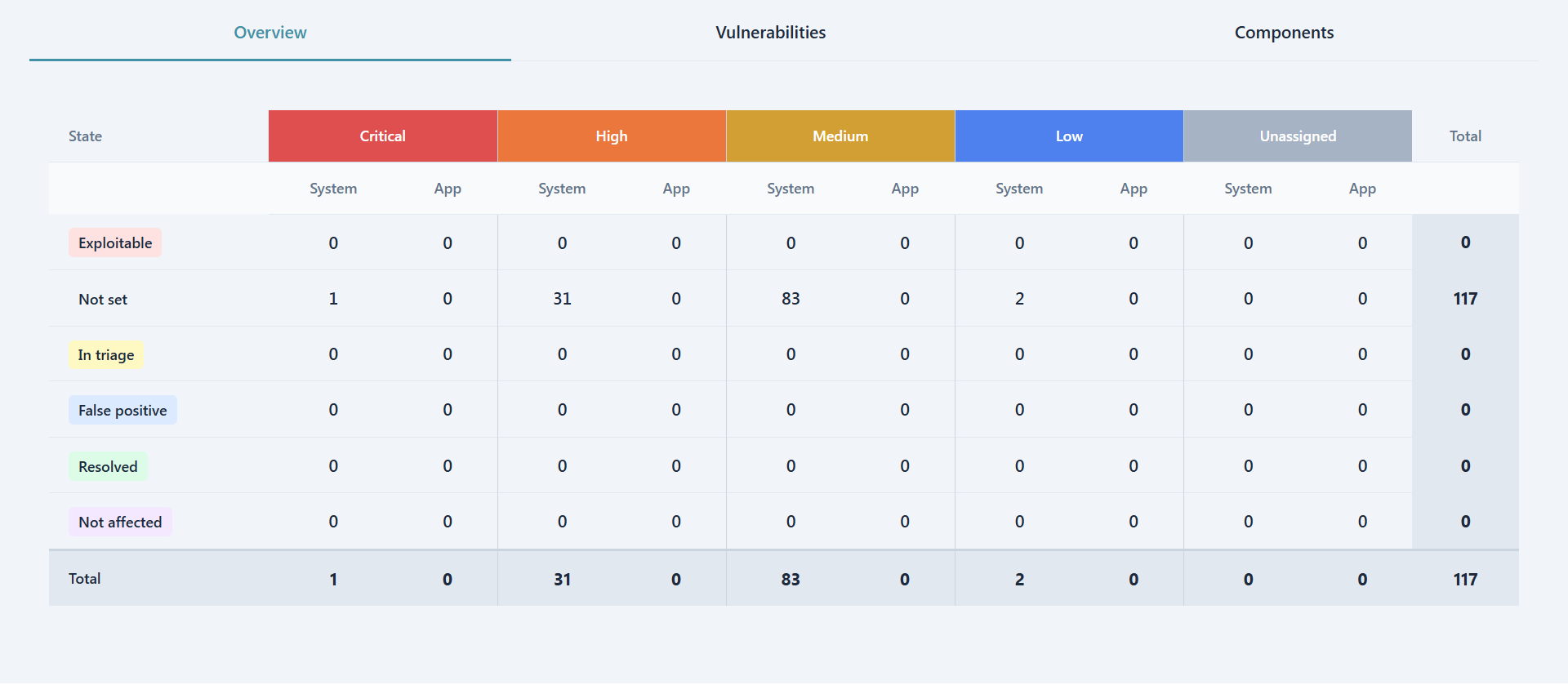
The overview tab shows for the currently selected firmware version a severity, triage and separation of concerns matrix. Each cell is clickable and forwards the user to the respective filtered Vulnerabilities list.
In the matrix severities generate the horizontal separation while the triage state the vertical one. Furthermore all vulnerabilities are divided between System, which are generated from DAVE's software, and App which instead concerns the customer own customization and software.
Vulnerabilitiies and Triage
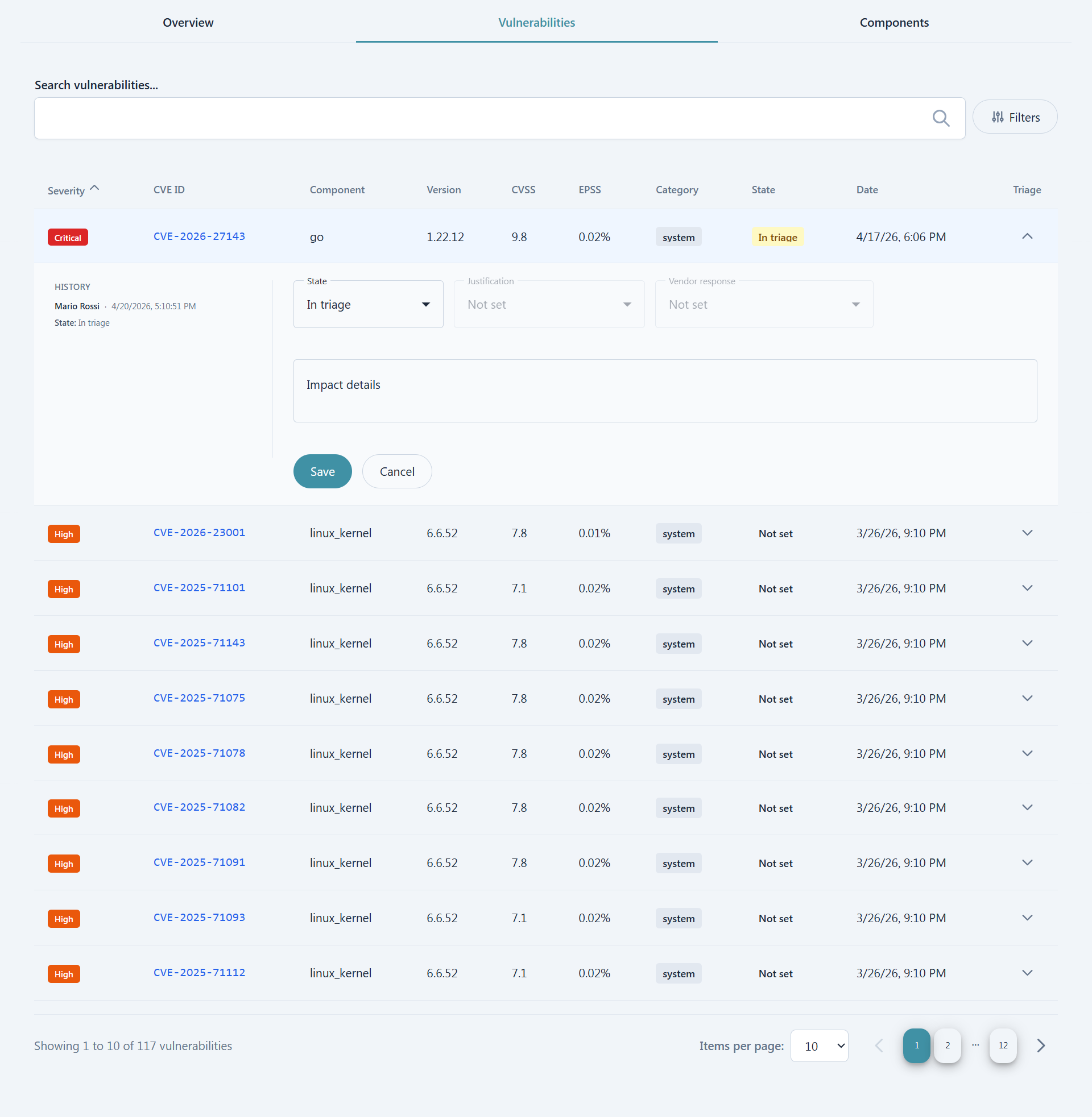
Inside the Vulnerabilities tab the list of affecting vulnerabilities is present. Users can filter either by searching directly for specific CVEs or components or by leveraging the more customizable filtering options, which cover severity, VEX status, System/App category, and CVSS and EPSS score ranges.
For users with enough permissions the Triage column is also present which enables a view of recent triage history as well as a form to perform aforementioned triage. Each triage sets an analysis state (for example In triage, Not affected, Exploitable, or Resolved); selecting Not affected asks for a justification, while Exploitable asks for the intended vendor response, and a free-text detail can always be added. Note that all changes to the triage state are tracked and stored permanently for later consulation.
Components
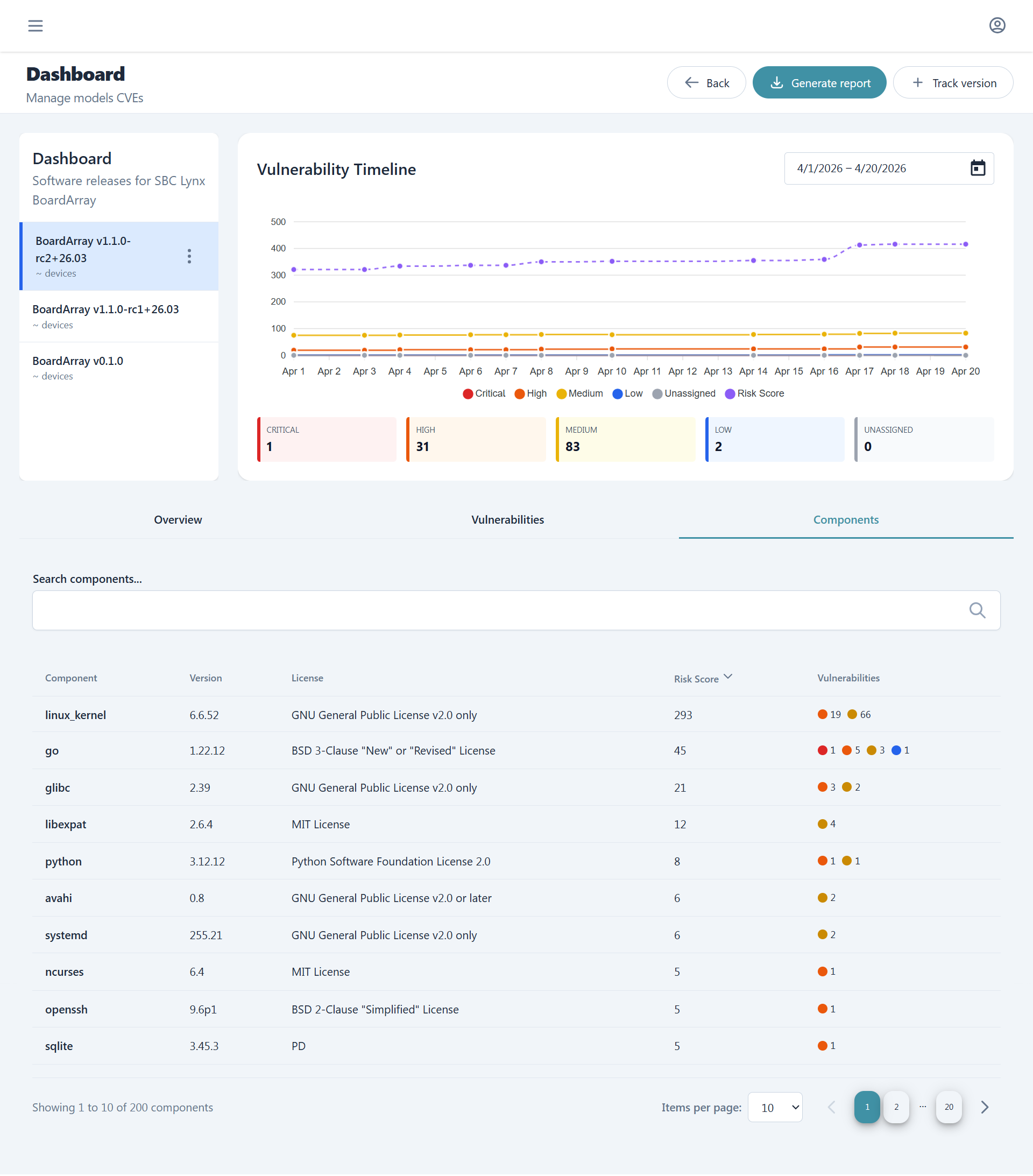
The last tab, Components, contains the list of all the components contained in the selected firmware version and for each we can see name, version, license, risk score and a summary of affecting vulnerabilities.
Analysis
The Analysis section provides advanced visualization and comparison tools to understand vulnerability trends and component evolution across firmware versions. Users can perform deep historical analysis on individual versions or compare multiple versions side-by-side to track security posture changes over time.
Deep Dive
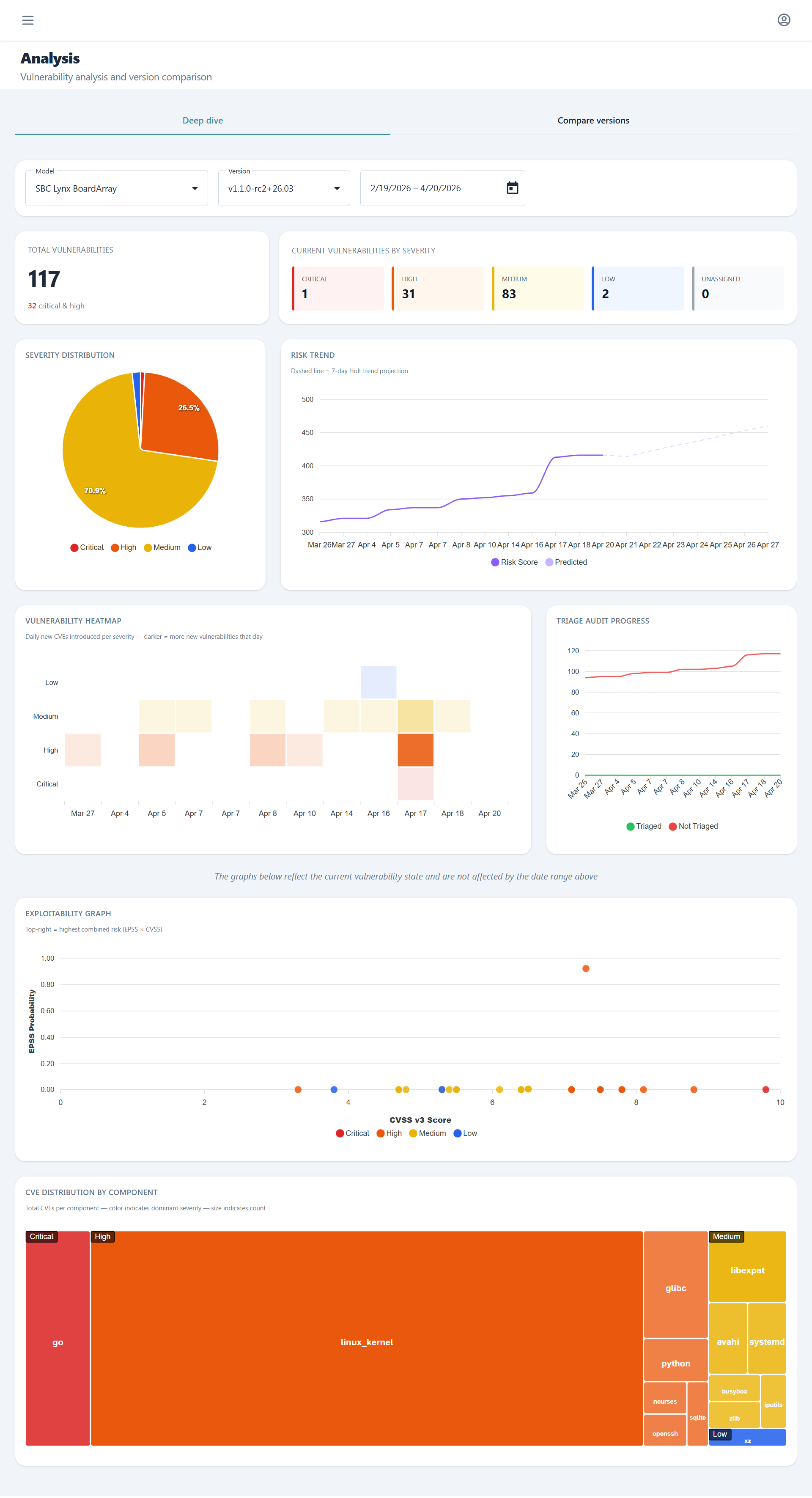
The Deep Dive tab offers comprehensive historical graphs and metrics for a specific model and firmware version. This view enables detailed temporal analysis of vulnerability patterns, severity distributions, and risk score evolution, helping teams understand how the security profile of a particular firmware version has changed over its lifecycle.
Compare Versions
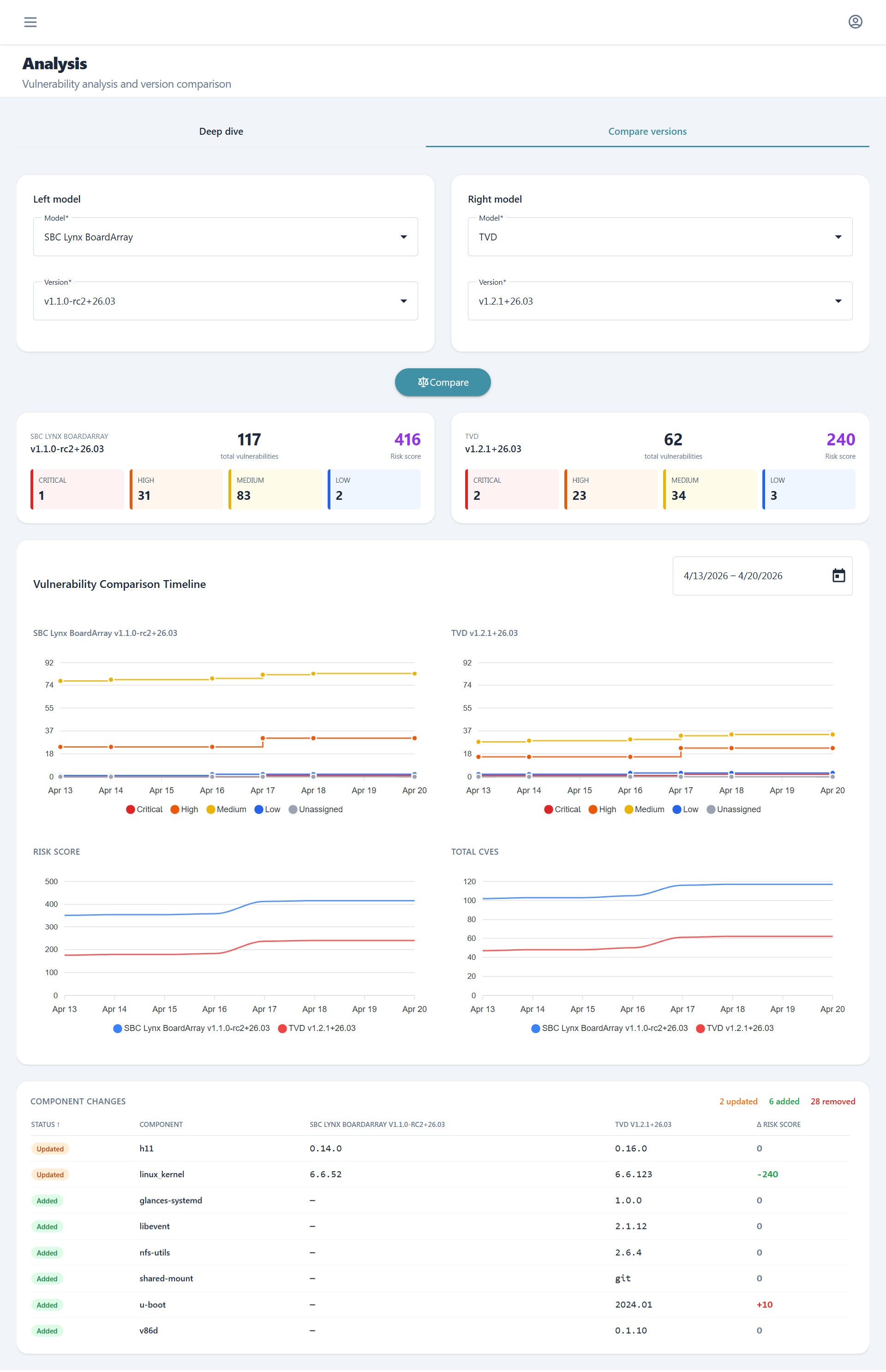
The Compare Versions tab enables side-by-side historical comparison across different models and firmware versions. Beyond vulnerability metrics, this view provides a detailed component change analysis showing which software components were added, removed, or updated between selected version pairs, making it easy to identify the source of new vulnerabilities or security improvements.
Reports
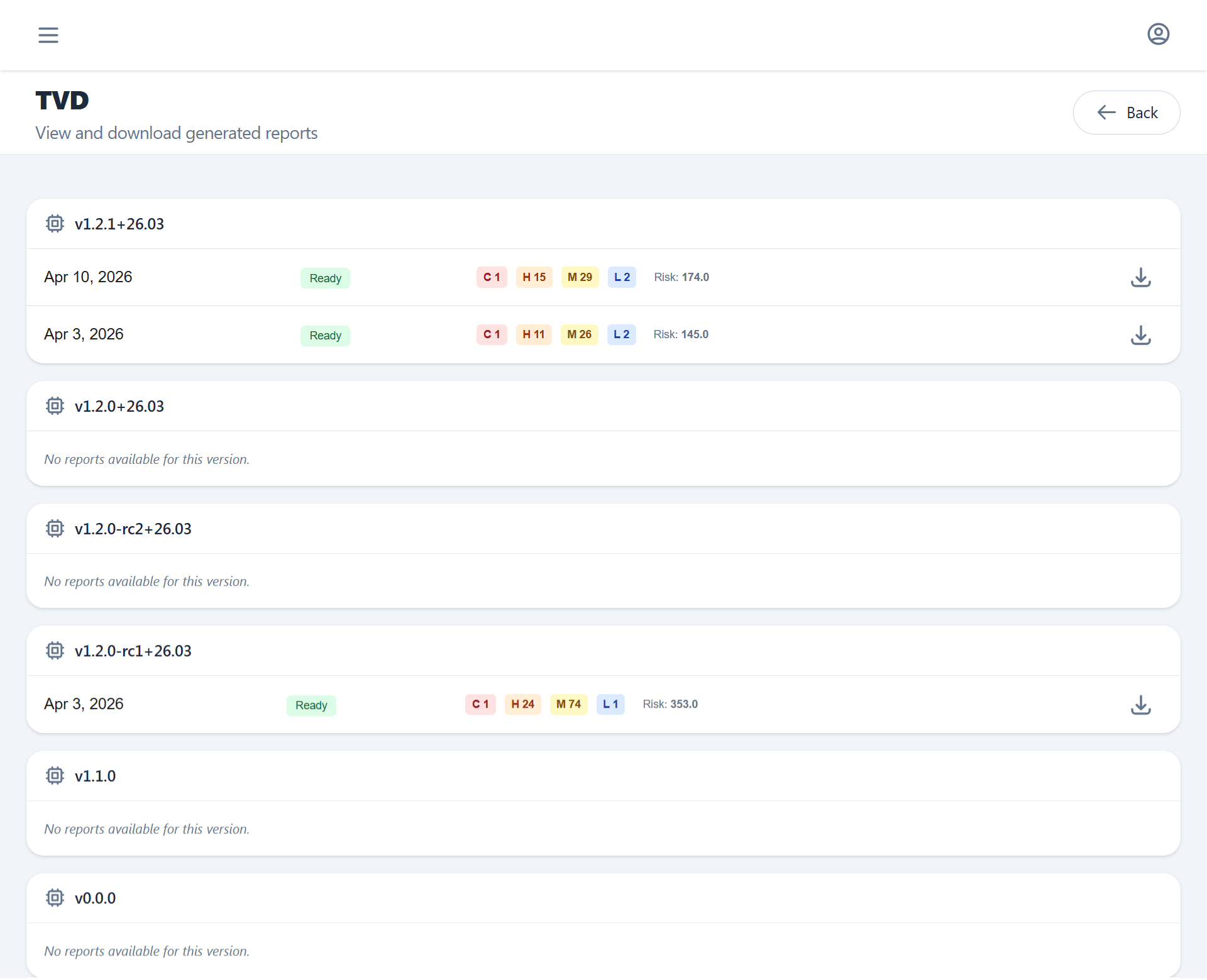
PDF security reports generated from the Overview section can bee seen from here.
Each report contains the project metadata, SBOM component table, CVE findings with CVSS scores, and generation timestamp.
Since reports are generated asynchronously users can here track progress, download available ones via one time use URL and visualize historical records.
Alarms
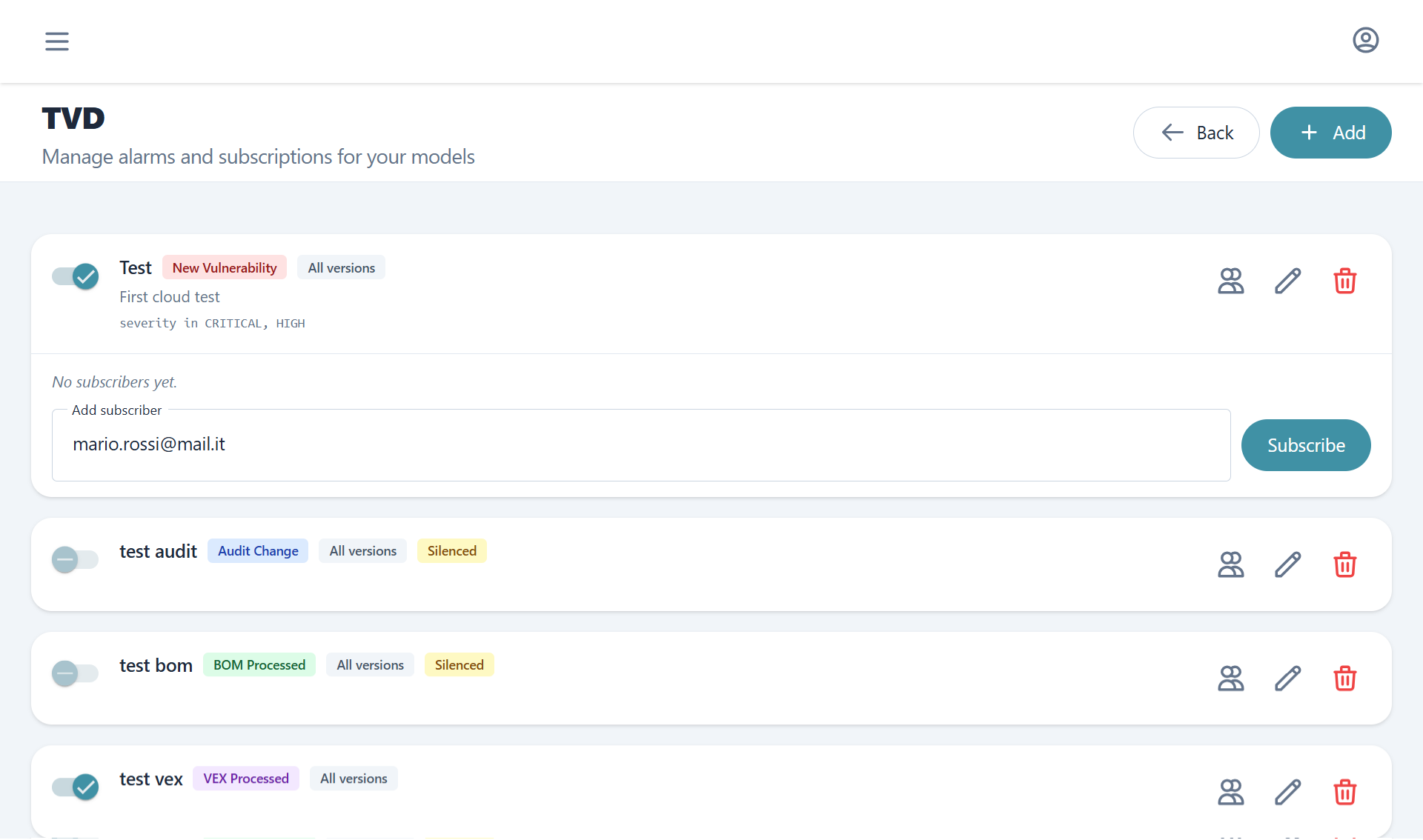
Alarms define rules that trigger email notifications when a monitored firmware project records a relevant event. For guidance on configuring alarms as part of an ongoing firmware maintenance practice, see SBOM Tracking. An alarm is scoped to a specific model: leaving the firmware version selection empty covers every version under that model, while selecting specific versions narrows it to that subset.
Supported alert types:
| Alert type | Trigger |
|---|---|
| New vulnerability | A new CVE was matched to a component |
| Project audit change | An analysis state was changed |
| BOM processed | SBOM ingestion completed |
| VEX processed | VEX file was processed |
New vulnerabilities, since they are more complex and frequent, can also get filtered using our custom filtering option. Rules combine with AND or OR logic and match on severity (one or more levels), CVSS score, and EPSS score, so that only findings above your chosen threshold generate a notification.
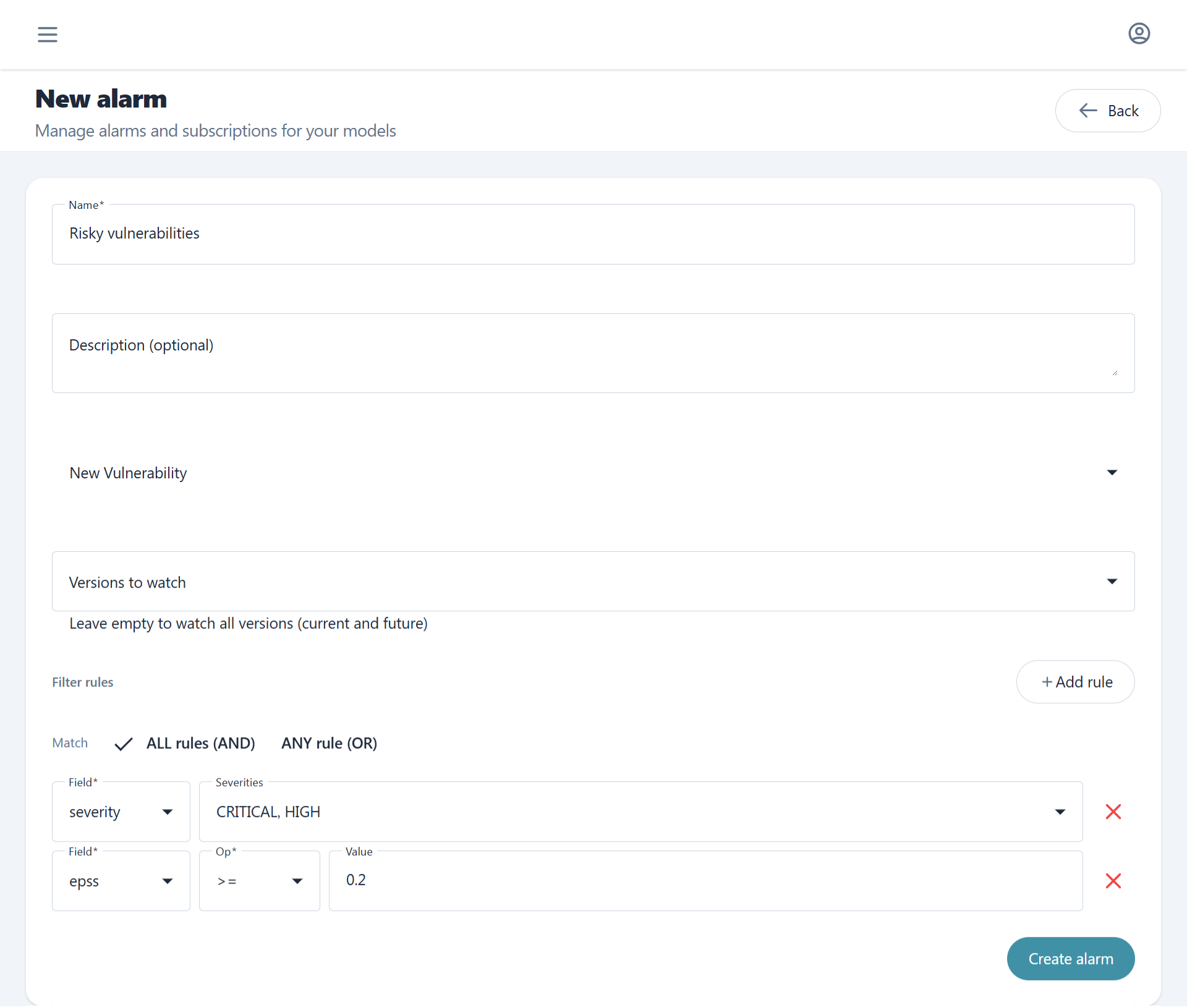
Each alarm can have multiple subscribers. Subscribers receive email notifications when the alarm's filter rules are satisfied.
Scope your alarm rules carefully
A New vulnerability alarm fires once per matched finding. A broad or unfiltered rule that covers every firmware version of a model can therefore generate a very large burst of emails the moment a new SBOM or VEX is processed, since a single upload can introduce or re-evaluate hundreds of components at once. Keep rules narrow, for example by raising the severity, CVSS, or EPSS threshold and by scoping the alarm to the firmware versions you actively maintain, so notifications stay actionable.